
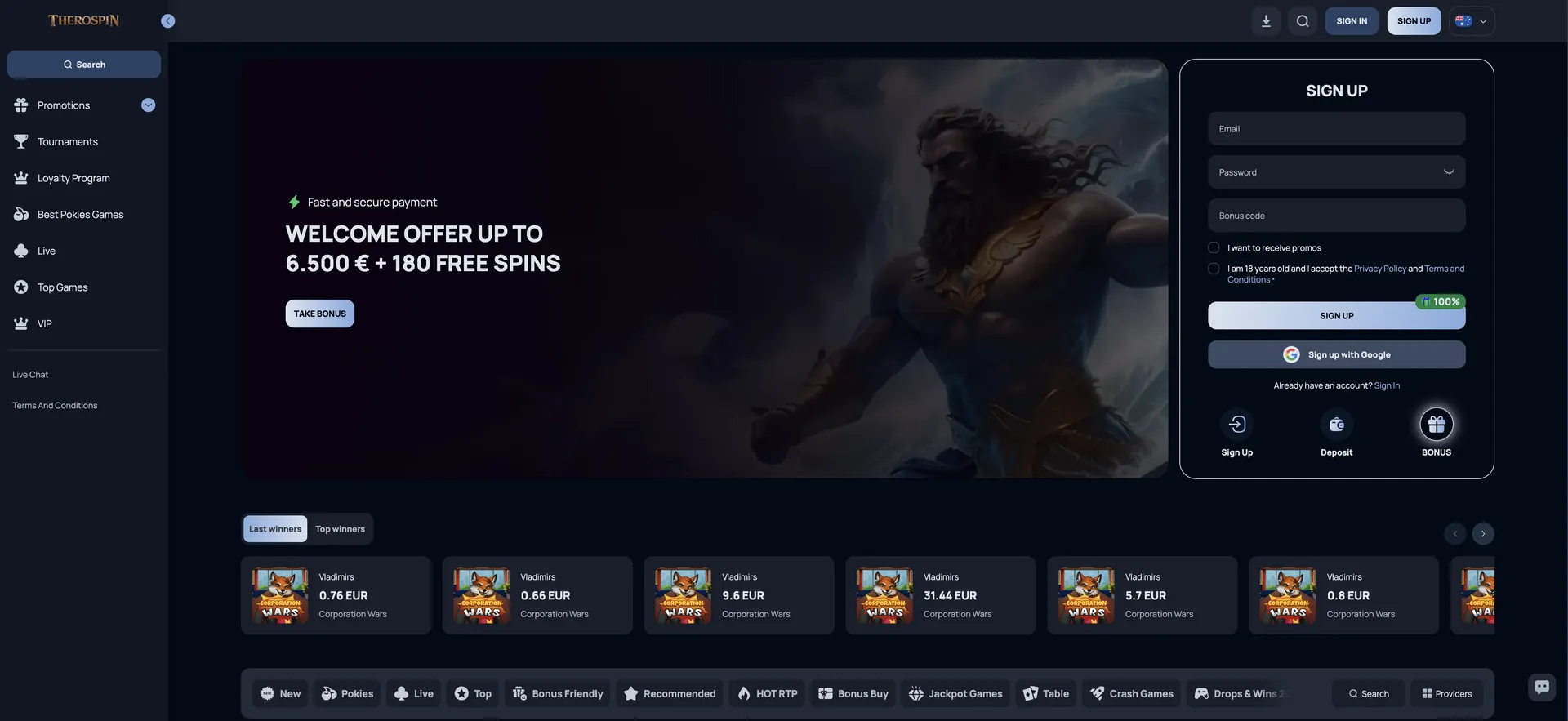
This guide covers how to open Therospin on a phone, how to add the shortcut on iOS and Android, what works in the mobile version, how AUD deposits and withdrawals work on mobile, and how to keep the account secure on a personal device.
| Feature | Mobile browser details |
|---|---|
| Store download | None - no App Store or Google Play app |
| iOS access | Safari, Chrome or Firefox on iPhone and iPad |
| Android access | Chrome, Firefox or any current browser |
| Home screen shortcut | Header download icon or browser menu |
| Game catalogue | Same as desktop, minus studios restricted in Australia |
| AUD cashier | Deposits from AUD 30, withdrawals from AUD 75 |
| Bonuses | Welcome pack, Game of the Month, Crypto Bonus, tournaments |
| Live casino | Evolution, Pragmatic Play Live, Ezugi and other studios |
| Sign-in | Email + password or Google |
| Security | SSL encryption, phone verification for withdrawals |
| Updates | Automatic - no manual updates needed |
Is there a Therospin app for Android or iOS?
No. Therospin does not publish a native app in the App Store or Google Play, and the casino's site does not offer an APK file for direct installation. Any app claiming to be the official Therospin app in a store or on a third-party download site is not provided by the operator and should be avoided, since it could capture login or payment details.
The mobile site is the official way to play on a phone. It is built on the same platform as desktop, so accounts, balances, bonuses and loyalty progress are shared across devices. A player can register on a laptop, deposit on a phone and withdraw on a tablet without any difference in features.
How to access Therospin on mobile
Opening the casino on a phone takes a few seconds and requires only a current browser and a data or Wi-Fi connection.
- Open Safari, Chrome or another browser on the phone.
- Go to the official Therospin website.
- Tap the menu icon to open the left-hand navigation: Promotions, Tournaments, Loyalty Program, Best Pokies Games, Live, Top Games and VIP.
- Tap SIGN IN to log in, or SIGN UP to create an account with email or Google.
- Open the cashier to deposit from AUD 30 and claim the welcome bonus.
- Choose a game from the lobby tabs or use Search.
How to add Therospin to your home screen
A home screen shortcut gives the same one-tap launch as an app. The site's header includes a download icon next to search that starts this process; the manual steps through the browser are below for both platforms.
iOS instructions (Safari)
On iPhone and iPad, the shortcut is created through Safari's share menu and opens the casino without the browser's address bar.
- Open the Therospin website in Safari.
- Tap the Share icon (the square with an upward arrow).
- Scroll down and tap Add to Home Screen.
- Keep the name "Therospin" or enter another label, then tap Add.
- Launch the casino from the new icon on the home screen.
Android instructions (Chrome)
On Android, Chrome adds the shortcut from its three-dot menu, and some devices show an install prompt automatically.
- Open the Therospin website in Chrome.
- Tap the three-dot menu in the top-right corner.
- Choose Add to Home screen or Install app.
- Confirm the name and tap Add.
- Open Therospin from the icon on the home screen or in the app drawer.
Features available in the Therospin mobile version
The mobile version keeps the full feature set of the desktop site, rearranged for touch screens. Nothing is reserved for desktop users.
- Pokies: the full lobby with New, Pokies, Top, Bonus Friendly, Recommended, HOT RTP, Bonus Buy and Jackpot Games tabs, plus demo mode.
- Live casino: Crazy Time, Lightning Roulette, Monopoly Big Baller, Infinite Blackjack and other tables streamed in HTML5.
- Table and crash games: digital blackjack, roulette and baccarat, plus Chicken Road, Plinko 2 and Tower Rush.
- Cashier: AUD deposits and withdrawals by card, bank transfer, e-wallet and crypto.
- Promotions: all welcome deposits, codes THERO75, THERO50, MONTH and CRYPTO, and free spin activation in the Bonus section.
- Tournaments and loyalty: Daily Spin Riot, network prize drops, loyalty levels and VIP progress.
- Account tools: verification upload by camera, phone verification and responsible gaming limits.
- Support: 24/7 live chat from the chat icon.
Therospin performance on mobile
Because the mobile version runs on the same platform as desktop, loading speed depends mainly on the device and the connection rather than on a separate app build.
- Lobby: game tiles load progressively as the page scrolls, so the first rows appear quickly even on 4G.
- Pokies: HTML5 titles from Pragmatic Play, BGaming and Hacksaw run without plugins, and many switch to portrait mode on phones.
- Live tables: Evolution and Pragmatic Play Live streams adapt quality to connection speed.
- Interrupted sessions: the casino's FAQ states that game progress is saved automatically, so refreshing the page and reopening the game returns to the same round.
- Loading problems: clearing the cache, disabling a VPN and trying another browser fixes most issues, as the FAQ recommends.
Mobile payments and withdrawals in AUD
The mobile cashier is identical to desktop and works in AUD. Limits below come from Therospin's payment terms and apply on every device.
| Operation | Methods | Minimum (AUD) | Limits / time |
|---|---|---|---|
| Deposit | Visa, Mastercard, bank transfer, e-wallets | AUD 30 | Max shown per method; instant after confirmation |
| Deposit | BTC, ETH, USDT, LTC, USDC, BNB | About USDT 23 equivalent for welcome bonus | No casino-side maximum |
| Withdrawal | Card, bank transfer, e-wallets | AUD 75 | Processed within 48 h; up to 5 business days to arrive |
| Withdrawal | Crypto | EUR 20 equivalent (about AUD 35) | Processed within 48 h, then network time |
| Withdrawal limits | All methods | - | AUD 7,500 per day / 15,000 per week / 30,000 per month |
Before the first mobile withdrawal, the phone number must be verified in the profile and ID documents uploaded under Profile → Verification. On a phone, the camera upload makes this the quickest part of the process.
Security on the Therospin mobile version
The mobile site uses the same SSL encryption as desktop, and logins, deposits and document uploads are protected in the same way. Phone number verification is required before withdrawals, which adds a check tied to the device owner. Using only the official website or a home screen shortcut created from it - rather than a downloaded third-party app - keeps credentials within the casino's own environment.
On shared phones or tablets, logging out after each session and not saving the password in the browser prevents another person from accessing the account. The terms allow one account per device and household, so a phone used by several family members to play can trigger duplicate-account checks.
Usage tips for Australian players
A few habits make mobile play at Therospin smoother for Australian accounts.
- Turn off any VPN before opening the site; VPN use is prohibited and can block access or winnings.
- Expect NetEnt titles to be missing and Amatic games restricted on Australian connections.
- Promotion times are set in UTC; Monday Spins, for example, run from 11:00 Monday to 10:59 Tuesday in Sydney and Melbourne during daylight saving.
- Use Wi-Fi for long live dealer sessions to avoid mobile data use and stream drops.
- Set deposit or loss limits in Responsible Gaming directly from the phone.
- Keep the browser updated so the sign-in pop-up and cashier load correctly.
Therospin app FAQ
Answers to the questions Australian players ask about playing Therospin on mobile.
Can I download the Therospin app from the App Store or Google Play?
No. Therospin has no store app. The casino runs in mobile browsers, and a home screen shortcut gives one-tap access.
Is there a Therospin APK for Android?
The official site does not offer an APK. Android users add the site to the home screen through Chrome's menu instead.
Does the mobile version have all the games?
Yes. The mobile lobby includes the same pokies, live tables, table and crash games as desktop, apart from studios restricted in Australia.
Can I claim the welcome bonus on mobile?
Yes. The welcome pack of up to AUD 9,750 + 180 free spins, codes and free spin activation all work in the mobile browser.
How do I withdraw on my phone?
Verify the phone number and upload documents in the profile, then open the cashier, choose a method and request at least AUD 75 (or the crypto minimum).
Is the Therospin mobile site safe?
The site uses SSL encryption on all pages. Using the official site or its home screen shortcut, rather than third-party apps, keeps login and payment data secure.
Do I need to update the Therospin shortcut?
No. The shortcut opens the live website, so updates apply automatically.